Welcome to your ultimate resource for finding that perfect memento wall hanging plaque. This is the ultimate solution for keeping your loved one that is away closer to home. Mission Trackers are perfect for families of serviceman, missionaries, and retired world travelers.
What is a Mission Tracker?
The Small Tracker has been discontinued.
Mission Tracker is on YouTube!
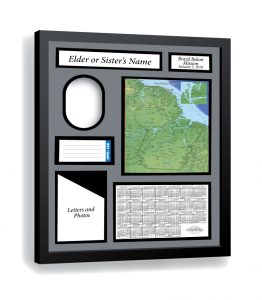
What is a Mission Tracker? A Mission Tracker is the ultimate lds missionary plaque and makes the perfect lds missionary gift. It is more than just an ordinary plaque, it is a beautiful wall-hanging. The Mission Tracker begins with a 16″ X 20″ black wood frame. This frame holds a laser-cut double mat that showcases the name of your family member or friend, the name of the mission and dates they will be gone, or the area of military deployment and dates gone at the top, in an elegant script font. The elongated oval opening is where you can place your favorite 3 1/2″ X 5″ or 4″ X 6″ photograph of your faraway family member.
A Mission Tracker can be used for keeping track of that special person who has to be away from home for an extended period of time. It is a great way to keep track of a missionary or missionary couple while they are gone on their Christian-based mission. Anyone who has a husband, son, or other family member in the military who gets deployed for a period of time will love the convenience of the wall plaque Tracker. It is also a great memento for that retired couple who takes an extended anniversary trip and wants to remember all the places they went. It is perfect for a girlfriend to keep track of all the areas her missionary or serviceman serves in while he is gone. It is a fully-personalized 16′ X 20 ” interactive memorial wall hanging to help keep your special person close to home.
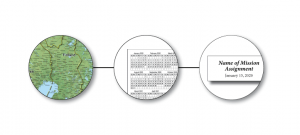
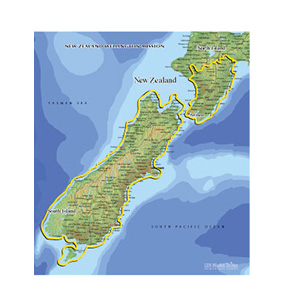
One of the most unique sections of the Tracker is the full-color cork-backed map. This map is topographical and to scale, with the actual boundaries of the mission or travel area outlined in an easy-to-see gold. Any special cities, like the one the missionary or serviceman is based in, can be highlighted. There are eight map-pins of assorted colors parked in the cork to the side or along the bottom of the map, waiting for you to mark the cities. The address cards are color-coded to the map pins so you can see where your missionary is at a glance. We have also included address cards for the MTC and the mission home. These cards can be personalized according to your needs.
The clear 4″X6″ pocket holds the latest letter or photograph from your missionary or serviceman. You can print out the latest email or just pop in the most recent snail-mail letter so that you can pick it up and read it again and again. The last pocket on the Tracker holds a full two-year-plus calendar. You can mark the calendar with colored pencils to match the address cards and map pins. This will help you see how long they are in each area. Soon, you will see how time has flown. For your convenience, this pocket is also clear so you have a place to display additional current photos.
When your family member returns, the Tracker makes a great memento for them to hang on their wall (If you can bear to give it up) . It is the ultimate resource for keeping your far-away family member right there at home.
How to use your Mission Tracker
- Place your missionary’s picture in the Tracker by bending (or turning) the tabs, removing the cardboard backing and taping the picture behind the photo opening. Replace the cardboard backing and bend the tabs back into place.
- Write your missionary’s MTC address and mailbox number on the MTC AREA card, and replace it in the AREA card window. Fill out the Mission Home address card and keep it handy – place it in either the letter or calendar pocket, or keep with the AREA cards
- When your missionary arrives in the mission, place the MTC address card behind the stack of AREA cards and write the address of the missionary’s first area on the AREA 1 card. Choose the matching colored pin and push it into the map in the corresponding city. If the city is not on the map, just put the pin in the general area of the city. Fill in the Mission Home card to keep that address handy for sending packages – you can put that card in the clear pocket with the calendar for easy reference.
- As your missionary transfers, move the old AREA card to the back of the stack and write the new address on the new AREA card. Add the matching colored pin to the map.
- Pull the calendar out of the clear pocket to mark it. Use colored pencils on the calendar to fill in each day that your missionary serves. (Permanent markers can be too dark, and highlighter markers can bleed) There are many ways to mark your calendar – some suggestions are:
- Color the dates on the calendar with the corresponding Area color during the time your missionary is in that Area (color the spaces red while the missionary is in the first area, then switch to blue when they move to the second area, etc.)
- Use one color while they are in the MTC, (or use one color to show the assignment they have in the MTC, such as blue for missionary and green for District Leader and color one corner of the calendar square red to show that they’re in the MTC at the same time), and then other colors when they reach the mission field.
- Use different colors when your missionary receives different assignments such as District Leader, Zone Leader or Trainer (or go two-toned if your missionary is filling two assignments at the same time)
- Use a designated color to represent transfer dates
- Use a designated color to represent convert baptisms
- You might add stickers for special events
- You can use the back of the address cards to write the names of the companions your missionary has while he is in that area.
- Place your missionary’s most current letter, email or photo in the letter pocket so that you and your family can easily view it again and again.
- When placing the letters in a scrapbook, you can back them with the color of the corresponding area for easy location later by your missionary.
- You can also place pictures in the calendar pocket.